
Keep trips in sync
The CSV is the money truth. Emails and quick entries keep the schedule fresh between uploads.
- 01
Re-upload the CSV whenever you want fresh numbers
The earnings CSV is the one source Turo guarantees, so it is the only thing allowed to write your money numbers. Re-uploading the same or overlapping exports is always safe; every trip is keyed on its Turo reservation number, so nothing ever duplicates.
- 02
Forward Turo's trip emails for live updates
Redirect Turo's booking notifications to your fleet address and new bookings, changes, and cancellations land on the dashboard within minutes. Emails refresh schedules and statuses; they never touch earnings on an imported trip.
- 03
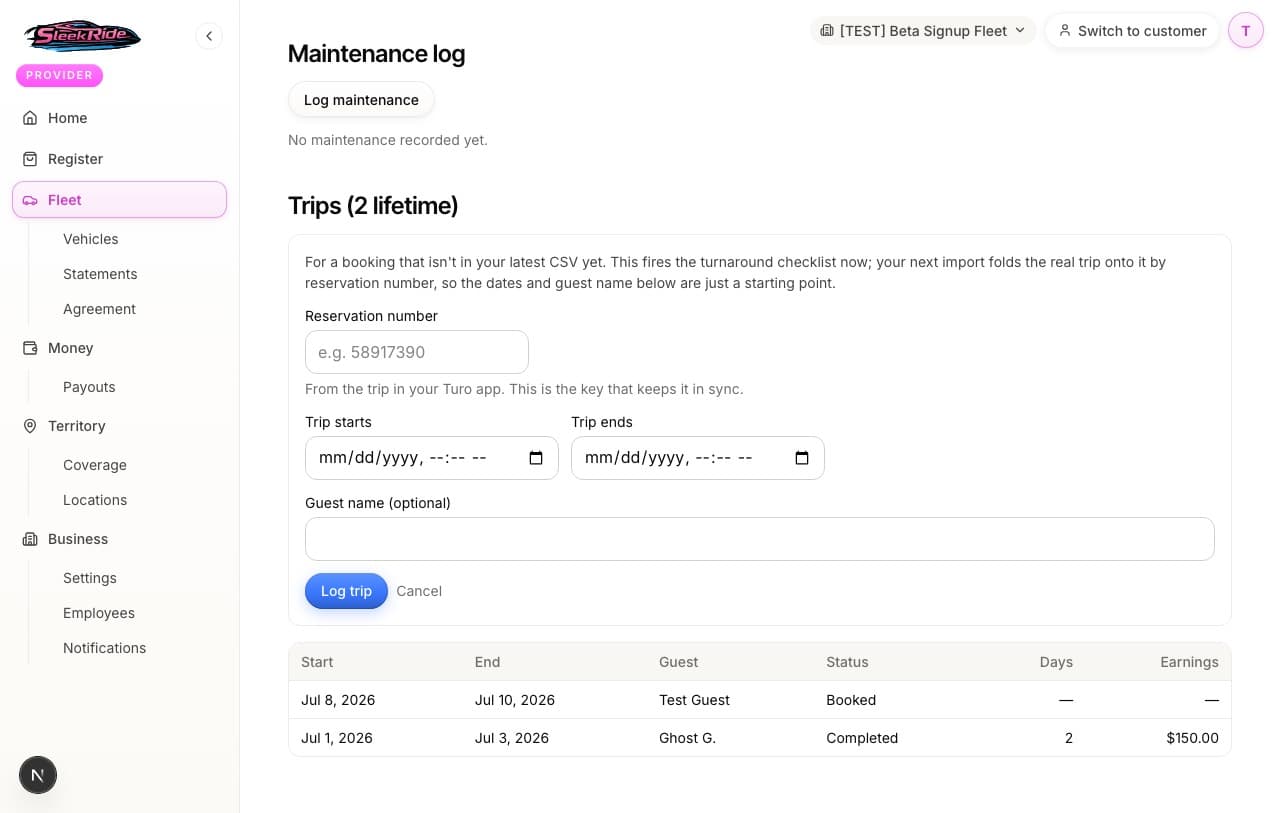
Log a same-day trip by reservation number
A booking just landed and the board needs it now? You (from the vehicle page) or your operator (from the task board) enter the Turo reservation number with rough times. Your next CSV upload folds onto the same row automatically and corrects the details.
The rules, plainly.
- The reservation number is the key to everything
- Dates change and guest names get mistyped; the reservation number never moves. Every path into the system converges on it, which is why double-pay on a turnaround is structurally impossible.
Updated 2026-07-07. Something here doesn't match what you see? Tell us and we'll fix the guide.